
You must send us your instrument info file so that we can create your pack.
First, connect a clean (formatted) USB stick to your device,
please note that you will also use this USB stick in the next steps.
function > menu2 > expansion > export instrument info
execute exporting > ok
send ***.n27 file to https://t.me/hkncebi
we will send you installation files
1- download the file we sent your telegram, unzip
2- copy all files and folders to the main directory of your usb disk
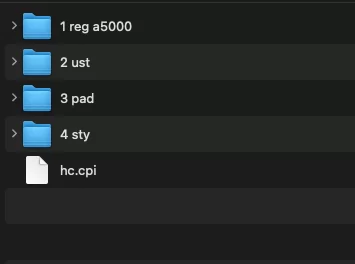
IMPORTANT: the files on your usb disk should be as in the photo
if you copy them into a folder or change their names, you may experience problems
3- remove the USB disk from your computer and insert it into the device
4- install to device
function > menu2 > expansion > pack installation > select "HC" >
"start installing "HC"?" > ok (F) all the expansion contents will be deleted > ok (G) >
"the instrument will be restarted" > ok > "installation has been completed" > ok
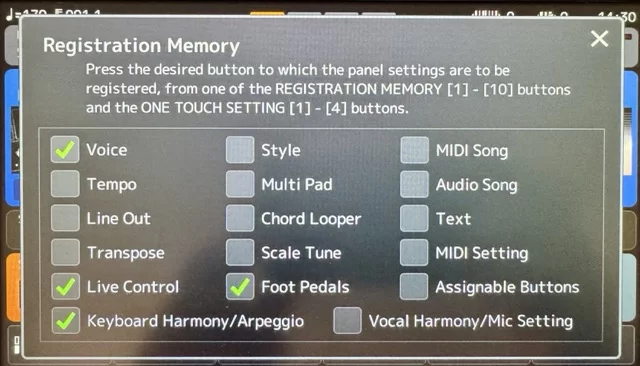
registration edit
to save the sounds you have prepared as a registration;
press the memory key once and then the number you want to save.
then to save your bank;
main screen J > menu 2 (num8) > save (num6) > ok (num 8 top)
if you don't want to lose your old bank, change the name.
name already exists > yes (G) to overwrite
tempo lock
function > style setting > tempo >
lock (tempo does not change)
hold (tempo does not change when rhythm is playing)
reset (tempo changes when rhythm changes)
audio pads
expand your stage performance with audio multipad banks;
pad screen I > USB (tab right) > open folder "3 pads" > select a multipad > play using multi pad controls
the banks you have obtained from us are in the "3 pad" folder.
the last update v26.7 was made on 11.07.26
please visit https://t.me/hkncebi to download your files
We use cookies on our site to provide you with a better experience. By using our site you accept the use of cookies.
